Forge Fleet Health logo
Desktop App Laravel Forge

Forge Fleet Health

One dashboard for every Laravel Forge account you manage. Import all your servers, match them to your SSH profiles, and run real, read-only health checks — CPU, memory, disks and services — whenever you click.

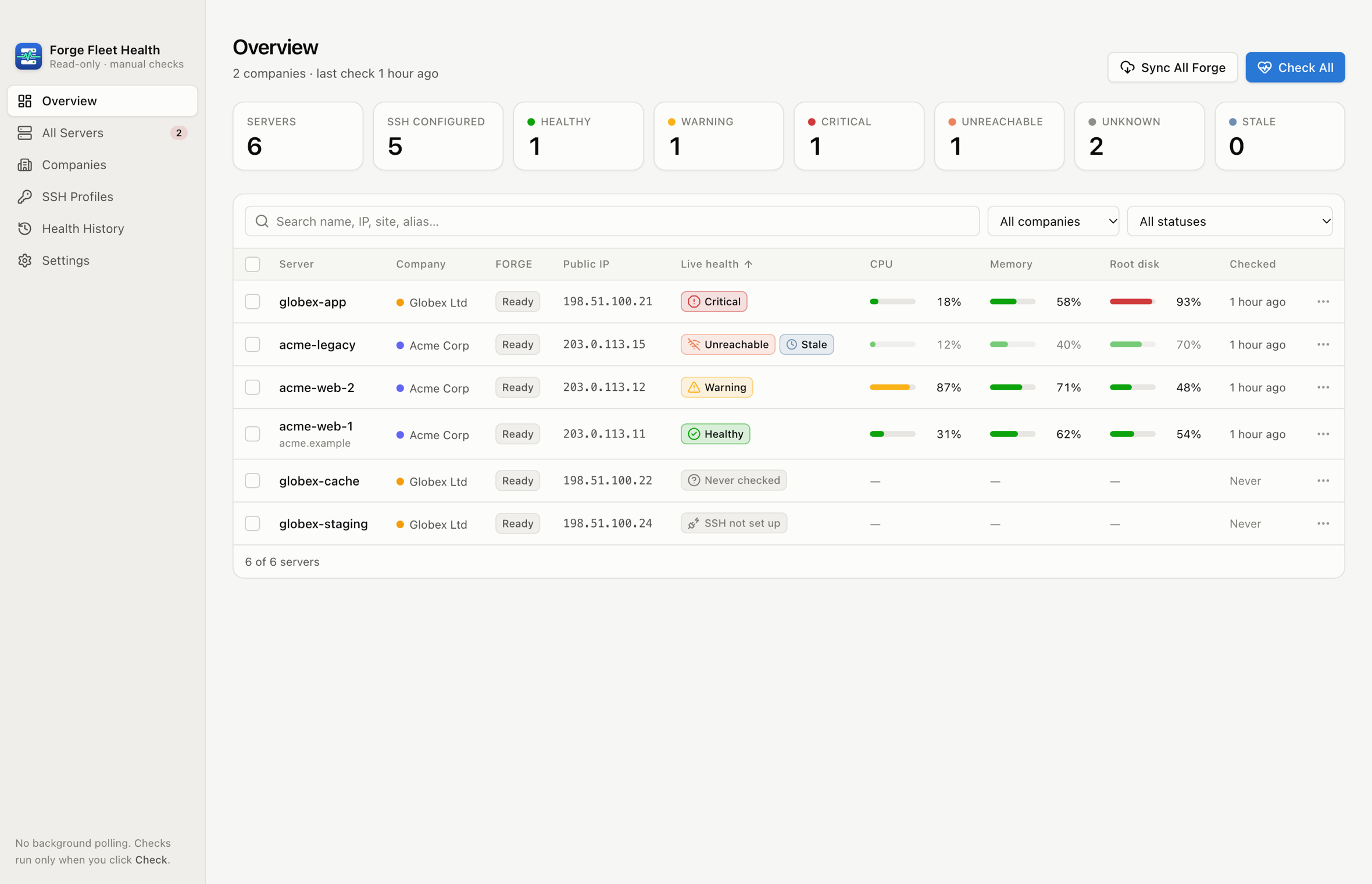
Forge Fleet Health overview showing fleet-wide health counts and a server table with live CPU, memory and disk usage across two companies

Features

Know How Every Server Is Really Doing

Forge tells you a server was provisioned. Forge Fleet Health tells you how it’s actually running, read straight from the machine over SSH.

Every Forge Account, One Dashboard

Connect several Laravel Forge accounts, one per company, each with its own API token. Servers from every organization are imported with full pagination, and overlapping server IDs or IPs are kept apart.

Real SSH Health, Not Forge Status

CPU (sampled from /proc/stat), memory based on MemAvailable, every persistent disk and inode usage, uptime, and services such as Nginx, PHP-FPM, MySQL, PostgreSQL, Redis and Supervisor.

Uses Your Existing SSH Setup

Matches servers to the Host aliases in your ~/.ssh/config and runs your own OpenSSH, so agents, Keychain keys, hardware keys and ProxyJump all keep working. Private keys are never read.

Read-Only by Design

A fixed, versioned diagnostics script runs over SSH stdin. It never uses sudo, installs nothing, changes no services and never reads .env files. Forge access is GET-only.

Checks Only When You Click

Check one server, a selection, a whole company, or everything, with live progress and cancel. Nothing polls in the background, and concurrency and timeouts are bounded.

Explainable Status

Healthy, Warning, Critical, Unreachable and Unknown, each with the exact rule that triggered it. Thresholds are editable, and required services are set per server so a database host isn't flagged for missing Nginx.

History That Tells the Truth

Every manual check is saved locally with CPU, memory and disk charts. A failed check never overwrites the last good reading, and old readings are clearly marked as stale.

Strict Host-Key Checking

Unknown host keys must be reviewed by fingerprint before the first connection. A changed key is reported as a mismatch and never replaced automatically.

Local-First and Offline

Tokens live in the macOS Keychain. Metadata and history stay in a local SQLite database. No cloud backend, no telemetry, and it works offline with your last results.

Built with Tauri and Rust for macOS (Apple Silicon). Signed and notarized.
Screenshots

A Closer Look

Light and dark mode, native on macOS. The servers shown are sample data.

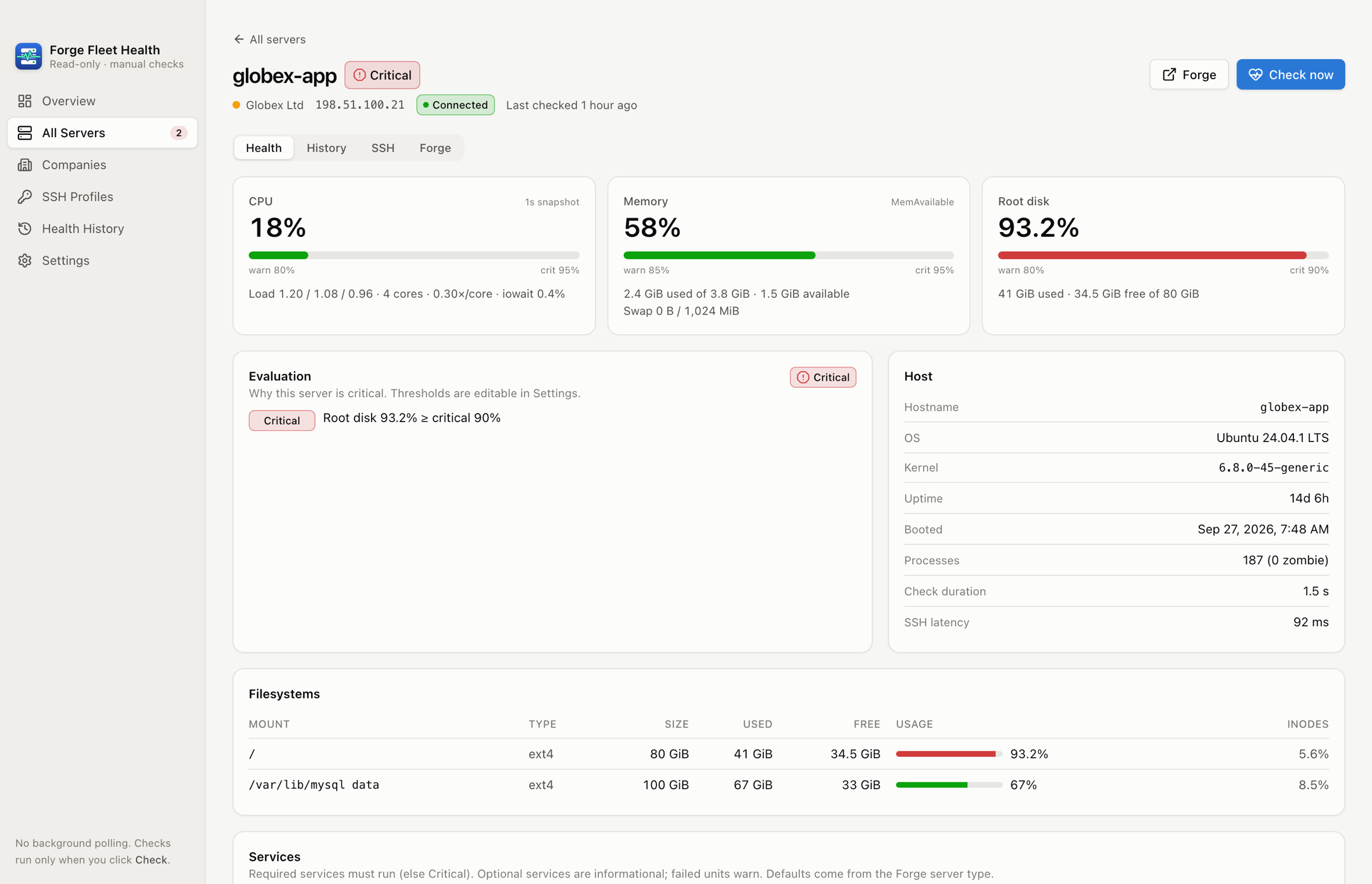
Forge Fleet Health server detail with CPU, memory and root disk gauges and an explanation of why the server is critical
Server detail. Gauges, load, filesystems, services and the exact rule behind the status.
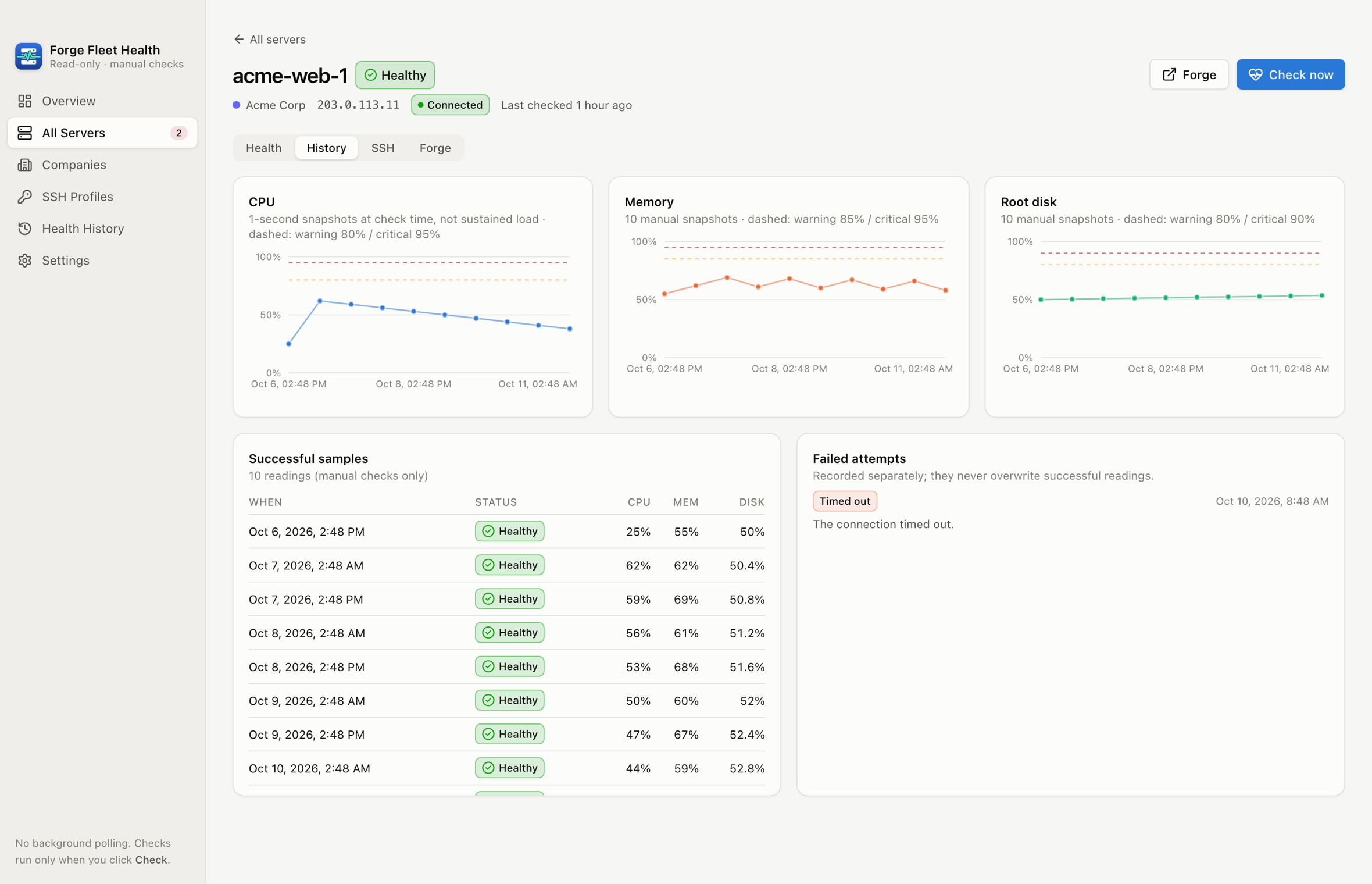
Forge Fleet Health history tab with CPU, memory and disk charts plus separate successful and failed check lists
History. Charts from your manual checks, with failed attempts recorded separately.
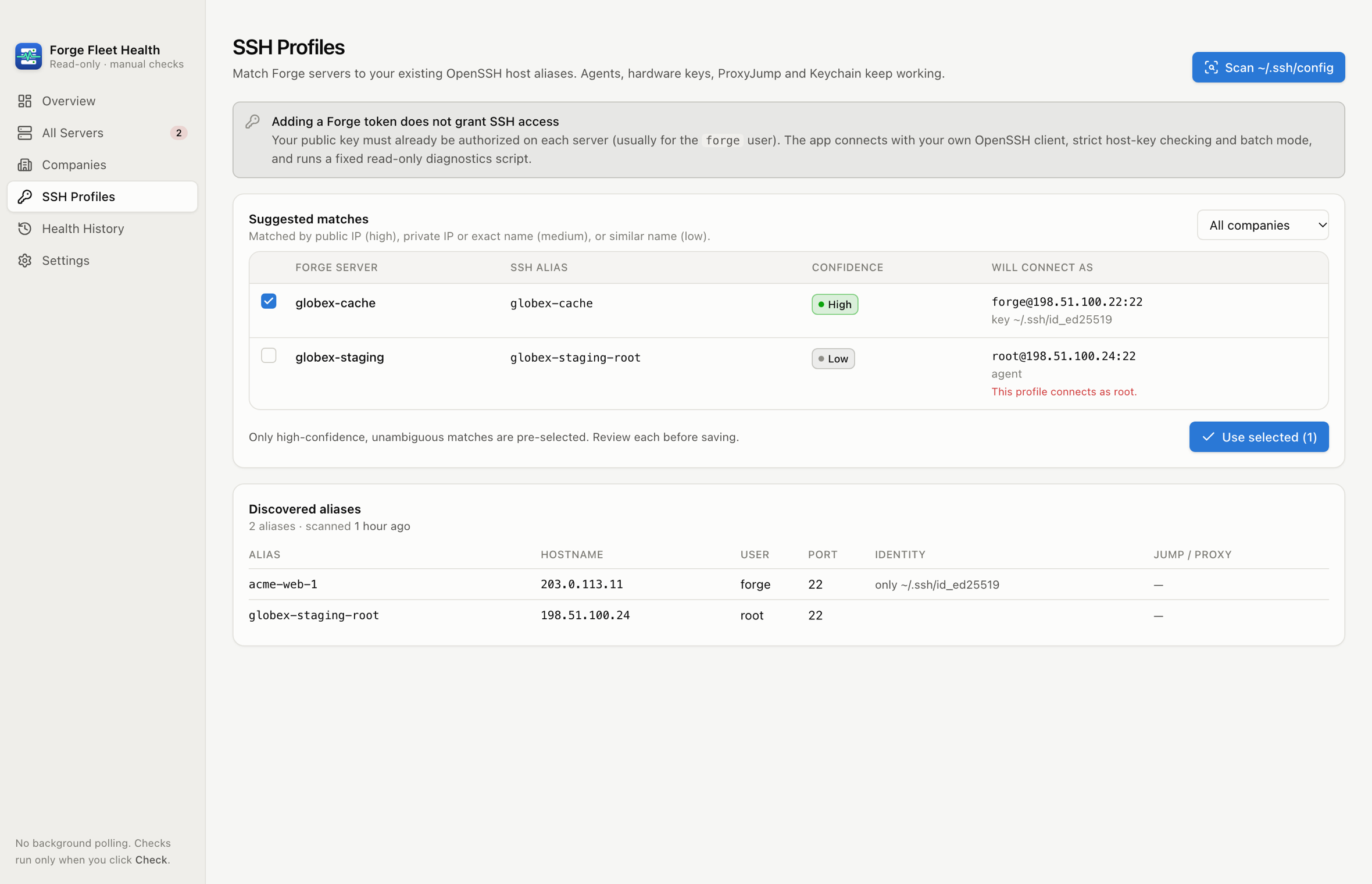
Forge Fleet Health SSH profile matching showing suggested ~/.ssh/config aliases with confidence levels
SSH matching. Suggestions from your ~/.ssh/config, with confidence and the user each alias connects as.
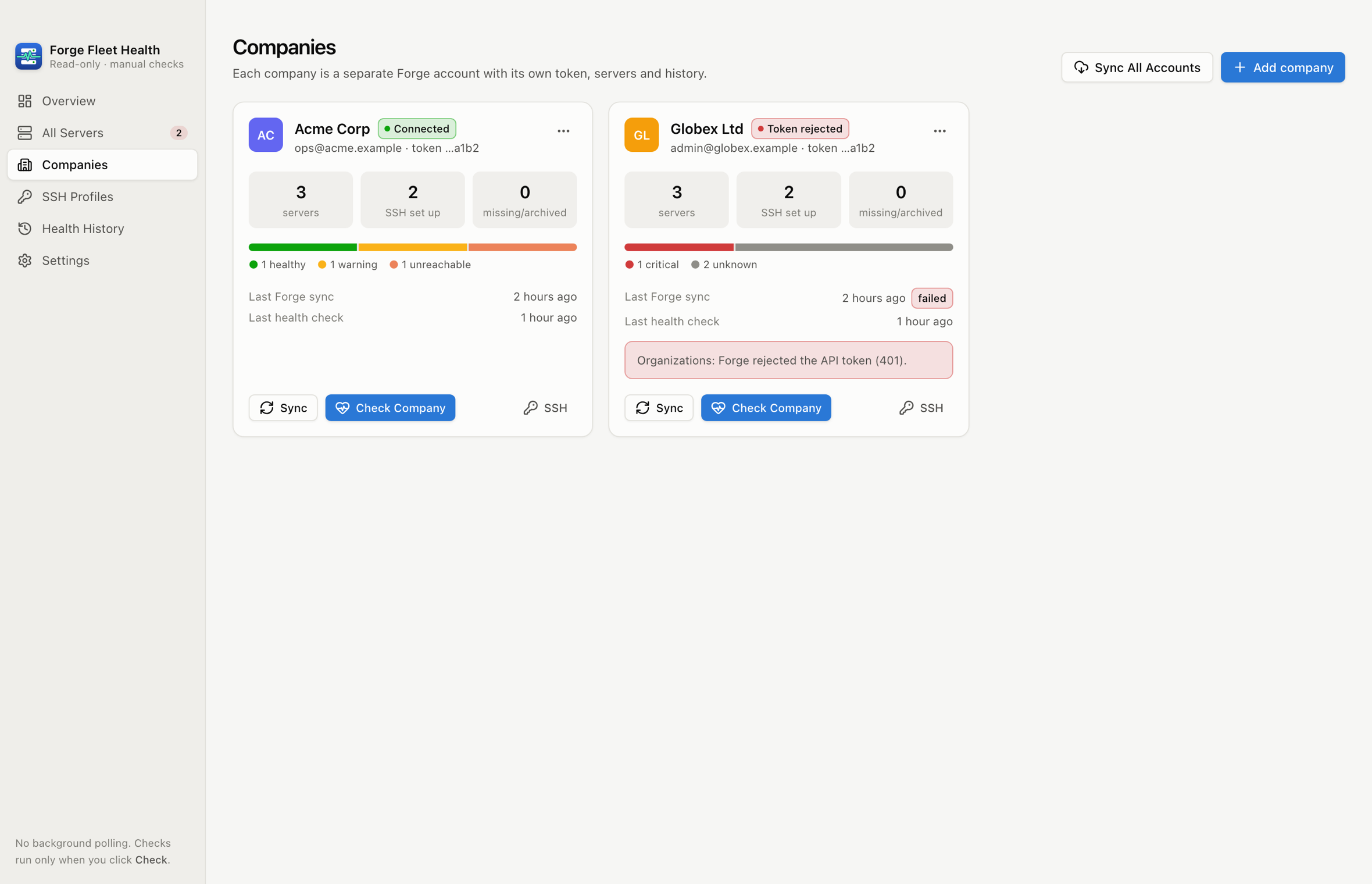
Forge Fleet Health companies view with a card per Forge account showing server counts, health and sync status
Companies. Each Forge account keeps its own token, servers, sync status and history.

Getting Started

Set Up in Five Minutes

  1. 1

    Add your Forge accounts

    Paste a Forge API token per company. Test Connection validates it before anything is stored, and the token goes straight into your Keychain.

  2. 2

    Import servers

    Every organization and server the token can see is imported, along with site names. Re-syncing never creates duplicates or deletes history.

  3. 3

    Match SSH profiles

    Scan your SSH config and review the suggested matches. Your public key must already be authorized on each server: a Forge token alone doesn’t grant SSH access.

  4. 4

    Test and approve host keys

    Each connection uses strict host-key checking. Unknown keys are shown by fingerprint so you can verify them first.

  5. 5

    Check health

    Click Check All and watch results arrive server by server. Run it again whenever you want a fresh reading.

Download

Get Forge Fleet Health

Free to download. Signed and notarized for macOS.

Requires the macOS OpenSSH client (built in) and SSH access to your servers. Laravel Forge is a trademark of Laravel Holdings Inc.; Forge Fleet Health is an independent tool and isn’t affiliated with Laravel.

Need Custom Infrastructure Tooling?

We build monitoring, deployment automation, and internal developer tools for startups and enterprises.